

Struggling to manage or join Telegram group links safely?
For marketers and business owners, Telegram is a goldmine for B2B networking and lead generation. But simply clicking a link isn't enough anymore. Whether you need to generate secure invite links for your own community or bypass Telegram's strict anti-spam filters without getting a permanent ban, this guide gives you the exact technical workflow.
👉 What are you trying to do today? (Click to jump)
- 🔗 I want to generate & manage secure invite links
- 🛡️ I need to safely join competitor groups without getting banned
- 👥 I need a Telegram CRM to manage multiple accounts at scale
This guide jumps straight into the technical "how-to" of generating, joining, and managing group links to scale your outreach safely, while keeping your data secure.
Understanding the Two Types of Telegram Group Links
Before you start joining or sharing, you must distinguish between the two link structures. This distinction is critical for controlling who enters your funnel.
1. Public Username Links (t.me/username)
- Format:
t.me/YourBusinessName - Behavior: Anyone can search for this group or click the link to join immediately.
- Use Case: Best for brand awareness and open communities in the US/EU where you want maximum visibility.
- Risk: High spam potential. Bots can easily find and join these groups.
2. Private Invite Links (t.me/+randomstring)
- Format:
t.me/+AbCdEfGhIjKort.me/joinchat/... - Behavior: Users cannot search for the group. They must have the specific link.
- Use Case: Ideal for "VIP Client Lists," "Beta Testers," or internal team operations.
- Control: You can revoke this link at any time. If a link leaks to a spam site, you kill the link, not the group.
Tutorial: How to Generate and Manage Invite Links
If you are building a community for your export business or SaaS user base, relying on a single static link is a mistake. Here is the professional workflow:
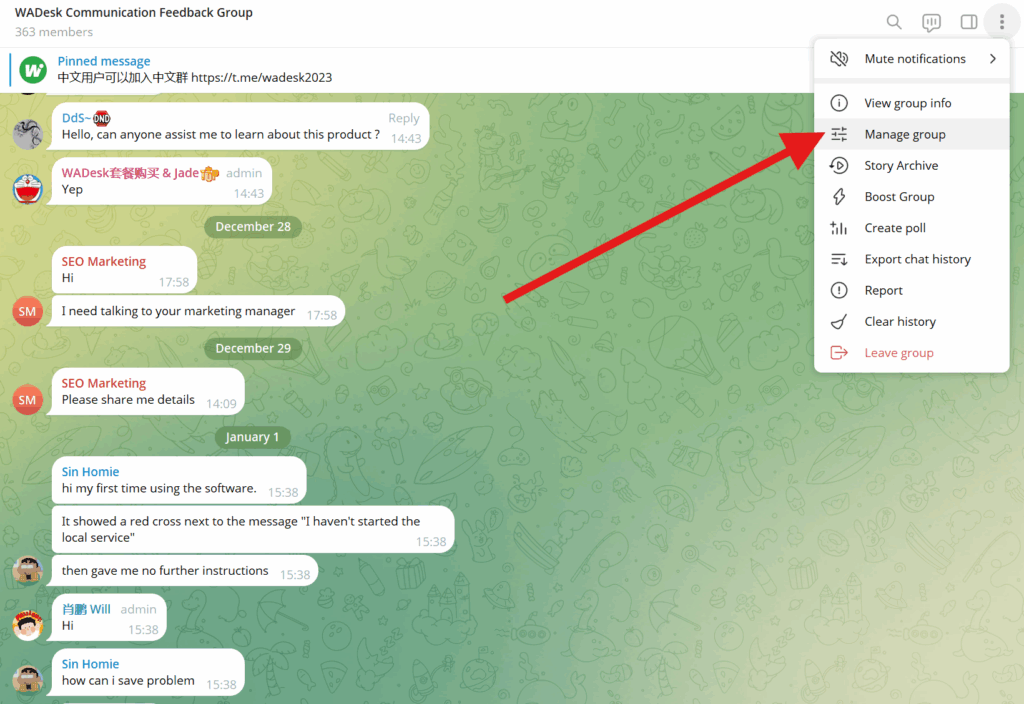
- Open Group Info: Go to your group and click on the group name.
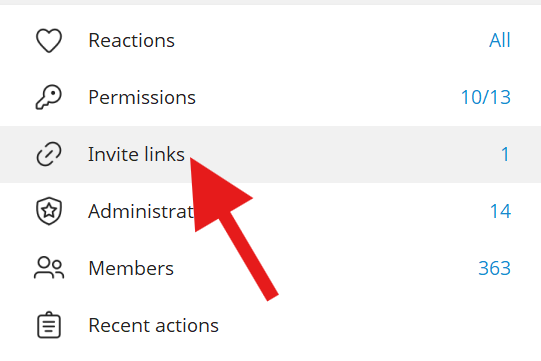
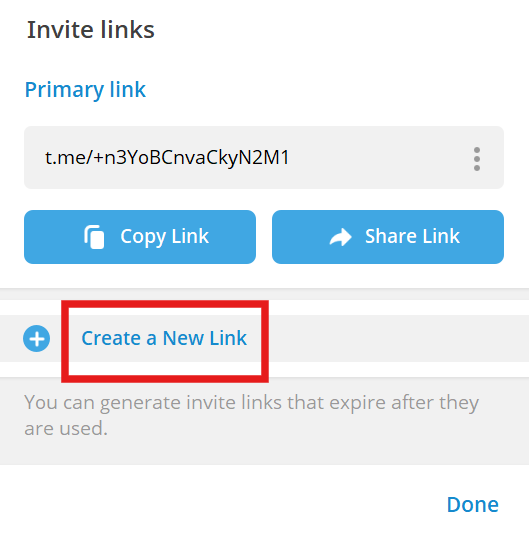
- Edit > Invite Links: Do not just copy the main link. Click "Manage Invite Links."
- Create a New Link:
- Set a Time Limit: Create a link that expires in 24 hours (creates urgency for leads).
- Set a Usage Limit: Create a link that only allows the first 100 users (perfect for "exclusive" US market campaigns).
- Request Admin Approval: Toggle "Request Admin Approval" on. This forces users to apply to join, allowing you to filter out bots or unqualified leads before they enter.
Pro Tip: If you are running ads in Europe (e.g., Germany/France), use separate invite links for each campaign source (e.g.,
Link Afor LinkedIn,Link Bfor Email). This allows you to track exactly which channel brings in high-quality members.
How to Safely Join Competitor or Lead Groups
For many export teams and marketers, the goal is to join existing industry groups to monitor trends or find leads. However, Telegram has strict anti-spam filters.
The "Join" Limit Problem
If you use a single account to join 20+ crypto or marketing groups in one hour, Telegram will likely flag your account. In Western markets, where reporting spam is common, this can lead to a permanent ban.
The Multi-Account Strategy
To scale your market research without risking your main business number, you need to split the load:
- Account Segmentation: Use different accounts for different regions (e.g., one US account for American groups, one UK account for British groups).
- IP Safety: Do not run 5 accounts joining groups from the same IP address simultaneously. This is a major red flag.
- Warm-up: Do not join groups immediately after creating an account. Engage in normal 1-on-1 chats for a few days first.
Scaling Up: Managing Multiple Accounts and Links with TGDesk
As you move from a beginner to a serious operator, manually logging in and out of accounts to join groups becomes impossible. You might be managing 10 accounts to cover the US market and another 10 for Europe.
This is where a dedicated management tool becomes necessary.
Centralized Group Management
Instead of checking 20 different phones or browser tabs, TGDesk allows you to aggregate all your Telegram accounts into one dashboard.
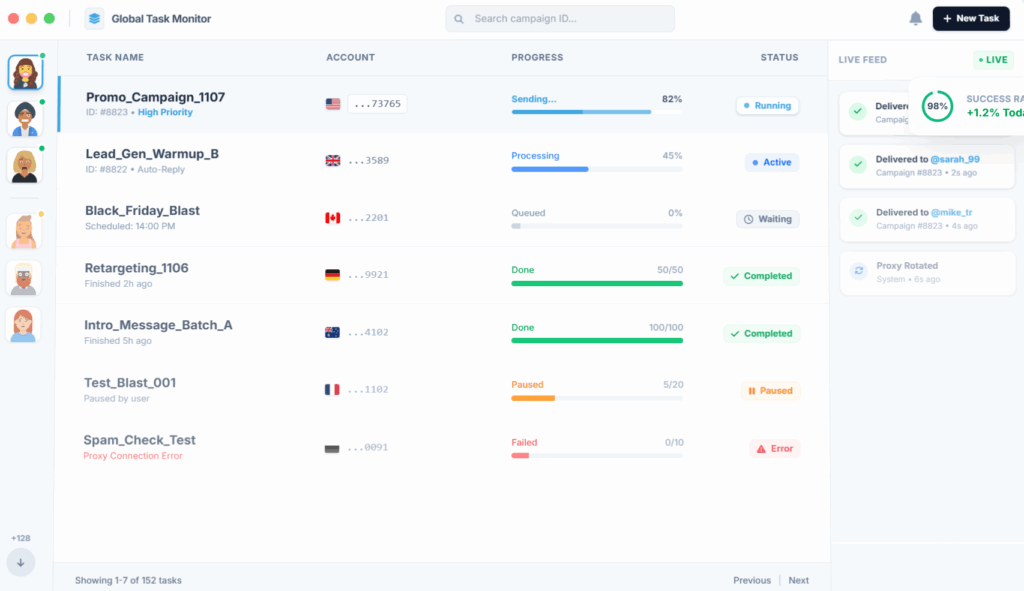
- Unified Interface: See all the groups your accounts have joined in one view.
- Bulk Actions: If you need to leave low-quality groups to make space for new ones, you can do it in bulk.
Secure Proxy Configuration
When operating in strict markets like Europe, connection stability and privacy are paramount. TGDesk allows you to bind a specific Proxy to each account.
- Why this matters: Your "US Marketing Account" will always appear to be connecting from a US IP address, even if you are working from an office in Asia. This significantly reduces the risk of being banned when you perform a Telegram group link join action.
Local Data Backup
Relying solely on Telegram's cloud is risky for business data. If an account gets banned, you lose those client contacts. TGDesk supports local data backup, ensuring that your chat history and group member lists are saved securely on your local device.
Summary
Mastering the Telegram group link join process is about more than just access; it is about control and security.
- For Group Owners: Use "Request Admin Approval" and expiring links to filter quality leads.
- For Marketers: Never mass-join groups with a single account. Split your activity across multiple accounts.
- For Teams: Use tools like TGDesk to manage proxies, backup data, and handle multi-account operations efficiently.
If you are ready to stop juggling SIM cards and start managing your Telegram marketing professionally, TGDesk offers the multi-account architecture and security features you need to scale safely.
deploy in 30 seconds with zero coding and effortlessly manage any Telegram group.
💬 Join the TGDesk official community for tips and support:
How to Scale Your Telegram Marketing with AI Bots: A Complete Strategy Guide for Growth Teams
Discover how to scale your Telegram marketing with AI bots. Our complete guide covers automated lead qualification, FAQ handling, and managing multiple bot accounts for growth teams.
How to Join a Telegram Group + Bulk Joining Workflow for Teams
How to join Telegram group join by link, handle approval required, fix “invite expired,” and organize bulk joining for work teams with TGDesk.