

Have you ever faced these problems?
- You see an amazing tutorial video in a Telegram group, but the official app only has a “Save to Gallery” button that often fails for large files.
- The group admin enabled “Forward/Save Disabled” – there’s no save button at all.
- You try a browser extension, but a small network glitch kills your download at 90% and you must start over.
- You want to queue 20 videos overnight, but you can’t close the browser or let your computer sleep.
Don’t worry. This tutorial will teach you a completely free desktop tool that beats every browser extension – TGDesk.
Want to jump straight to “How to download from groups that disabled saving”? Go to Section 3.
1. Common Download Methods and Their Pain Points
Method 1: Official Telegram Client (Mobile/Desktop)
- Pros: Built-in, no extra install.
- Cons:
- No batch download – one by one only.
- Large videos often fail to save.
- Cannot download anything from groups with “Forward/Save Disabled” (the button disappears).
- No resuming – any interruption means starting from zero.
Method 2: Browser Extensions (e.g., TG Downloader, etc.)
- Pros: Easy to add a download button on Telegram Web.
- Fatal flaws (99% of extensions):
- ❌ No resumable downloads – network flutter, close browser, sleep PC → full restart.
- ❌ No background download – you must keep the browser tab active and visible. Switch apps or lock screen? Download stops immediately.
- ❌ No media management – files dump into your Downloads folder, impossible to organize.
- ❌ Cannot bypass “Save Disabled” – extensions share the same restrictions as Telegram Web.
- ❌ Some are paid or limited – free versions have size caps, watermarks, or ads.
Method 3: Third-party online download websites
- High risk: You send message links to unknown servers – privacy nightmare. Also slow and unreliable for large files.
Bottom line: none of these methods give you stability, background operation, media organization, and the ability to download from restricted groups at the same time. The solution? A professional desktop Telegram CRM client with a built‑in download system.
2. How to Download Telegram Videos/Images Efficiently (TGDesk Step-by-Step)
TGDesk is a desktop Telegram CRM client with a powerful built‑in media download system. Best of all: core download features are permanently free – no ads, no speed limits.
Step 1: Download & Install TGDesk
Go to TGDesk and download the Windows or macOS version. Install and log into your Telegram account (same as official client, completely safe).
Step 2: Select the Media You Want
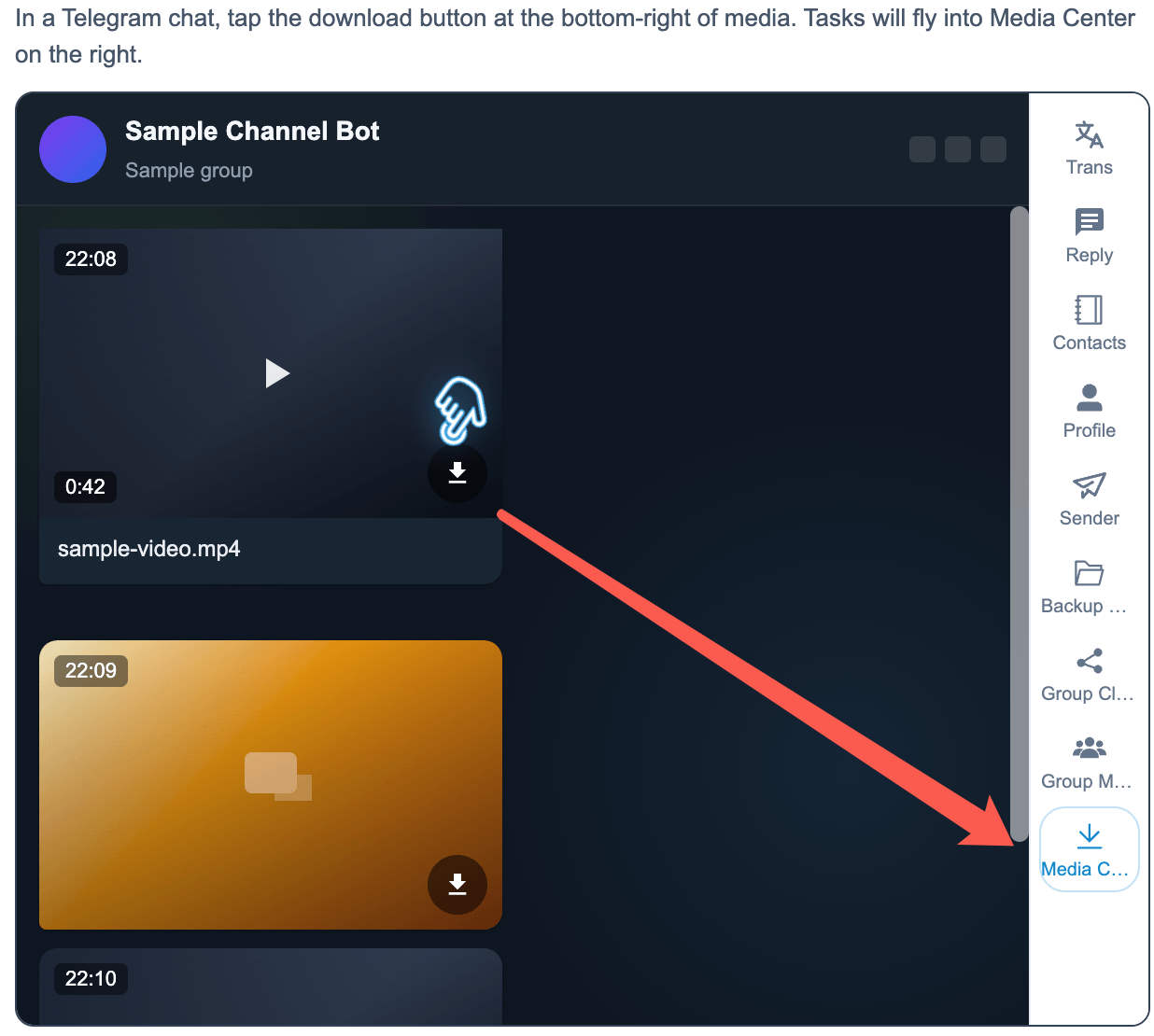
In any chat, select one or multiple image/video messages (multi‑select with Ctrl/Cmd + click). Works with normal groups, supergroups, channels, and even groups that have “Forward/Save Disabled” enabled.
Step 3: One-Click Download
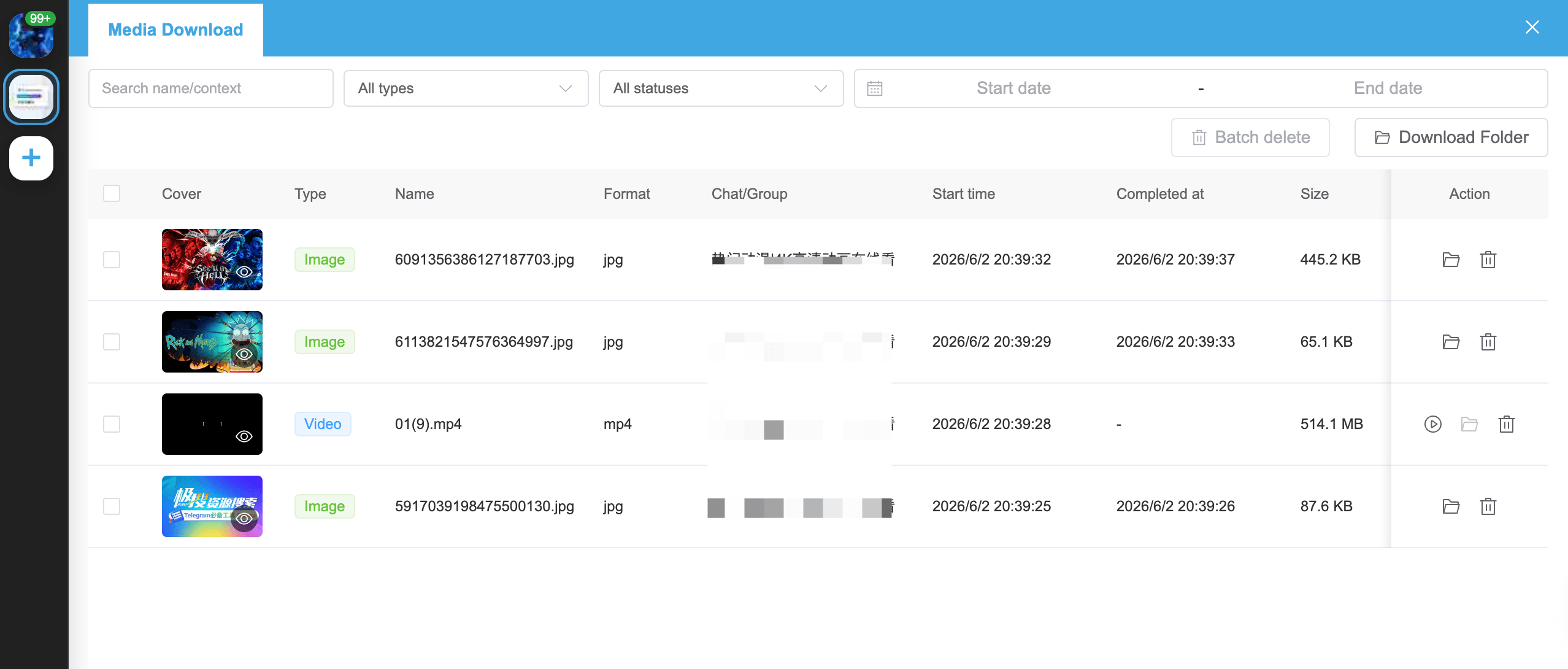
Click the “Download” button above the selected messages (or right‑click → Download). TGDesk starts downloading immediately and opens the Media Manager window.
Step 4: Enjoy “God‑Level” Download Experience
- Resumable download: Turn off Wi-Fi or restart your PC? Reopen TGDesk – the download continues right where it stopped. No progress lost.
- Background download: Minimize or close the main TGDesk window – the download process runs quietly in the system background. Go work, play games, even shut down (resume later).
- Parallel multi‑task: Download 10 videos simultaneously, each with its own progress bar, no interference.
- Media Manager: In the built‑in manager, filter by group, media type, date; open file location instantly; bulk delete.
Pro tip: To download an entire group’s video history, use TGDesk’s batch selection – pick dozens of messages, add them to the queue, and let it run overnight.
3. How to Download from Groups with “Save Disabled” (Compliant)
Many business communities and course groups enable “Forward/Save Disabled” protection. The official app and browser extensions completely block saving. But TGDesk, using your own account credentials, lets you download restricted videos for free.
How it works: TGDesk acts as you viewing the message – it’s not hacking or stealing. If you can see the video in the group, TGDesk can save it to your local disk. Think of it as a smarter, batch‑capable screenshot.
The operation is identical: In a restricted group, the official “Save” button is hidden, but TGDesk’s download button remains available. Select the video → click Download → done. No technical hurdles.
⚠️ Please respect group rules and copyright laws. This feature is for personal backup and learning only – do not redistribute maliciously.
4. TGDesk vs. Mainstream Browser Extensions: Who Wins?
| Feature | Typical Browser Extension | TGDesk Desktop Client |
|---|---|---|
| Resumable download | ❌ No | ✅ Full support |
| Background download | ❌ Tab must stay active | ✅ System‑level background |
| Parallel multi‑task | ⚠️ Basic queue, prone to conflicts | ✅ Intelligent concurrency |
| Media manager | ❌ None | ✅ Professional manager (filter/sort/bulk) |
| Download from “Save Disabled” groups | ❌ Cannot | ✅ Supported |
| Future auto‑transcoding | ❌ Impossible | ✅ Coming soon (fix black screen / no audio) |
| Pricing | Some paid / limited / ads | Core download free forever |
Clear verdict: What extensions do poorly, TGDesk does perfectly. What extensions can’t do, TGDesk does natively. Download TGDesk for free right now.
5. What’s Coming Next
The TGDesk team is building two killer features:
- Auto‑collect group videos: Set rules, and TGDesk automatically monitors specified groups for new videos and triggers downloads instantly.
- Windows auto‑transcoding: After download, automatically convert videos to a universal format (MP4) so they play with one double‑click – no more black screen or missing audio.
All basic download features (resumable, background, multi‑task, media manager, restricted‑group download) remain free forever.
6. Experience True Download Freedom Today
Stop tolerating browser extensions that crash, lack background support, and can’t resume. Try TGDesk.
- Official website: TGDesk
- Feature overview: TGDesk Media Downloader
- Supported OS: Windows / macOS
- Completely free, no ads, no privacy risk
Your time is valuable – don’t waste it on failed downloads and messy file management. Head over to the TGDesk official website and download it for free.
If this guide helped you, please share it with friends who struggle with Telegram downloads. For questions or feedback, reach out via our website support or Telegram community.
Coming next: How to batch export Telegram group members and automate marketing (coming soon).
How to Add People on Telegram + Bulk Adding Workflow for Teams
How to add people on Telegram by username or phone number, handle privacy settings, fix "user not found," and organize bulk adding for work teams with TGDesk.
Telegram Proxy Guide 2026: From Basic Setup on Mobile/PC to Advanced IP
Fix Telegram connection issues instantly with our 2026 proxy guide. Step-by-step MTProto setup for Android/iOS & PC to bypass blocks and reduce lag.